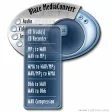
Blaze MediaConvert is a powerful multimedia batch converter supporting conversion among over 140 image, audio, animation, and video formats quickly and easily. Unlike other conversion applications that support only one or (at most) a few formats, Blaze MediaConvert is able to batch convert among nearly all multimedia formats conceivable.
For audio formats, two-way conversions among CD, MP3, WMA, WAV, and OGG, WAV/MP3 Compression, and more are all supported. The software features advanced audio CD burning from any of the supported formats.
Blaze MediaConvert can also perform two-way video conversions among MPEG-1, MPEG-2, AVI, WMV, Animated GIF, Multi-Page TIFF, and FLIC. The Video Constructor combines selected images to create a video in the destination format. The Video Decompiler saves all frames within the selected video as single images. The extracted images can be saved as BMP, GIF, JPG, PCX, PNG, PNM, RAS, RGB, TGA, TIFF, and XPM.
The CD Recorder allows you to burn MP3 and WAV files to CDR and CDR/W. Its features include Fast multi-threaded design, Advanced buffering for superior performance, Easy track manipulation, Works easily with IDE and SCSI CD drives, Disk caching offered for the best quality results possible, and the ability to Write from network locations with caching feature.
The CD Converter provides many advanced options, including a CDDB auto-save feature, which enables track title, artist, and album information to be dynamically downloaded from the Internet CD Database and used when converting CD tracks to WAV, MP3, or WMA.
Additional features include Animated GIF creation, Animated GIF decompiling, drag and drop support, versatile preferences for maximum control, and much more.
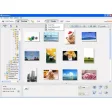
The conversions are easy to use and straight-forward. Simply select the type of conversion you want to perform, add the files to convert, arrange the files in any desired order (optional), select the output format, and select the convert command.

.png)

























User reviews about Blaze MediaConvert
Have you tried Blaze MediaConvert? Be the first to leave your opinion!